타입 가드(Type Guard)
배울 개념
intersection Typeunion TypeType Guard
1. 문제 발생
interface Animal {
  eat: () => void;
  sleep: () => void;
}
class Dog implements Animal {
  eat() {}
  sleep() {}
}
class Cat implements Animal {
  eat() {}
  sleep() {}
}
Dog클래스에 bark()메서드를 추가하고 싶은데?
- 그러기 위해선,
Animal인터페이스에 bark()를 추가해야하고, Animal인터페이스를 구현하는 Cat클래스도 bark()메서드를 구현해야하는 비효율이 발생한다.
- 해당 타입을 쓰는 모든 코드에 변경을 가하지 않고, 특정 코드만 자유롭게 타입을 확장하는 방법 없을까?
2. Intersection Type
type Human = {
  think: () => void,
};

type Developer = {
  work: () => void,
};

const junha: Human & Developer = {
  think() {
    console.log(`I'm thinking`);
  },
  work() {
    console.log(`I'm working`);
  },
};
언제 사용해?
Intersection Type은 기존 타입을 대체하지 않으면서, 새로운 필드를 추가하고 싶을 때 사용
type Human = {
  think: () => void;
};
type Developer = {
  work: () => void;
};
type Rich = {
  flex: () => void;
};

const junha: Human & Developer & Rich = {
  think() {
    console.log(`I'm thinking`);
  },
  work() {
    console.log(`I'm working`);
  },
  flex() {
    console.log(`I'm flexing`);
  },
};
- 기존의
Human & Developer 타입의 junha에 Rich 타입을 추가해 기존 타입은 변경하지 않고 확장할 수 있다.
주의!! 각 타입에 겹치는 필드가 있다면 어떻게 될까?
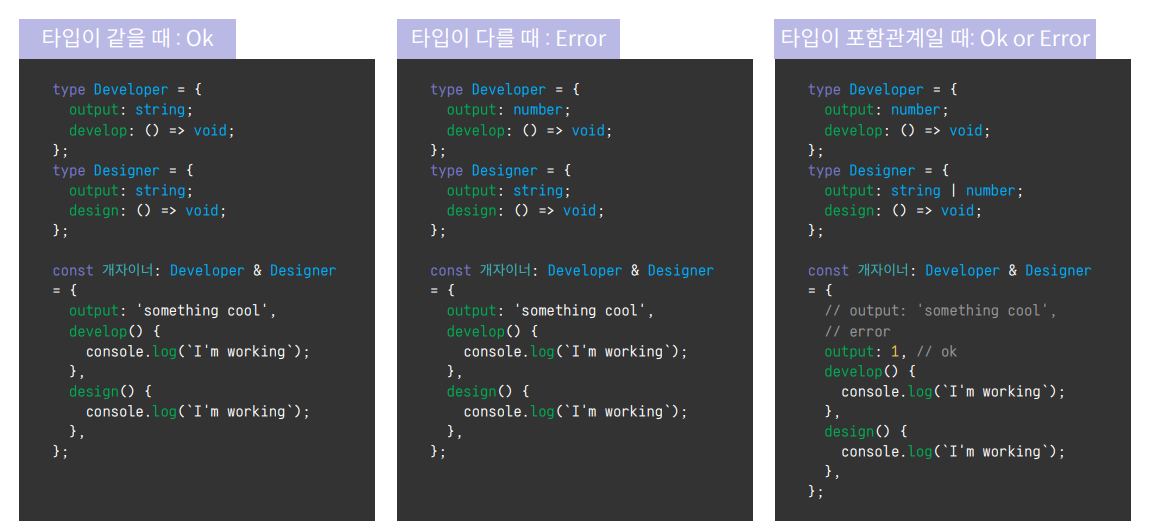
- intersection 하려는 두 타입의 필드가 다르다면 오류를 출력한다.
//  develop 메서드 선언, 매개변수는 없고, 반환 타입은 void이다
type Developer = {
  develop: () => void;
};

type Designer = {
  design: () => void;
};

const 개자이너: Developer & Designer = {
  develop() {
    console.log("I'm programming");
  },
  design() {
    console.log("I'm designing");
  },
};

개자이너.develop(); // I'm programming 출력
개자이너.design(); // I'm designing 출력
3. Union Type
let one: string | number;
one = '1';
one = 1;
언제 사용해?
- 여러 타입 중 하나가 올 것이라고 가정할 때 사용한다.
- 하지만 인터페이스는 유니온 타입을 확장하지 못한다.
- 이때는
type 키워드와 &(Intersection Type)을 사용해 확장한다.
type A = string | number;

interface StrOrNum extends A {
  a: string;
}
// error An interface can only extend
// an object type or intersection of object types with statically known members.

type StrOrNum = {
  a: string;
} & (string | number);
// Ok
주의!! Union Type은 동시에 여러 타입이 될 수 없다.
type Human = {
  think: () => void;
};
type Dog = {
  bark: () => void;
};

declare function getType(): Human | Dog;

const junha = getType();
junha.think(); // Property 'think' does not exist on type 'Dog'.
junha.bark(); // Property 'bark' does not exist on type 'Human'.
junha의 타입은 유니언 타입으로 선언되었기 때문에, Human인지 Dog인지 확신할 수 없다.- 따라서
think, bark 둘 중 어느 메서드도 사용하지 못한다.
junha.think() 함수를 호출할 때 junha가 Human이라면 괜찮지만 Dog라면 think를 호출할 수 없기 때문에 컴파일 단계에서 에러가 나온다.- 이 에러는
타입 가드를 통해 해결할 수 있다.
4. Type Guard
1) 타입 가드란?
- 데이터의 타입을 알 수 없거나, 될 수 있는 타입이 여러 개라고 가정할 때, 조건문을 통해 데이터의 타입을 좁혀나가는 것을 말한다.
- 데이터의 타입에 따라 대응하여 에러를 최소화할 수 있다.
- 타입을 통해 ‘가드’하는 코드, 방어적인 코드를 짤 수 있다.
2) 타입 가드를 사용해 유니언 타입을 제대로 사용해보자
type Human = {
  think: () => void;
};
type Dog = {
  tail: string;
  bark: () => void;
};

declare function getType(): Human | Dog;

const junha = getType();

// here is the clue
if ('tail' in junha) {
  junha.bark();
} else {
  junha.think();
}
3) What happend?!
- 타입스크립트에게 타입을 추론할 수 있도록
단서를 주었다!
- 이렇게 타입을 구별할 수 있는 단서가 있는 유니온 타입은 구별된 유니온라고(태그된 유니온, 서로소 유니온)한다.
4) 실무에서 자주 쓰는 구별된 유니온과 타입 가드
type SuccessResponse = {
  status: true;
  data: any;
};
type FailureResponse = {
  status: false;
  error: Error;
};

type CustomResponse = SuccessResponse | FailureResponse;

declare function getData(): CustomResponse;

const response: CustomResponse = getData();
if (response.status) {
  console.log(response.data);
} else if (response.status === false) {
  console.log(response.error);
}
- 서버에서 오는 응답 또는 함수의 결과가 여러 갈래로 나뉠 때 구별된 유니온 사용 가능
- 타입의 단서를 토대로 타입 가드를하고, 응답의 결과에 따라 다른 작업을 실행시켜준다.
5) 다양한 연산자를 통한 타입 가드
01. instanceof
- 클래스도 타입이다. 객체가 어떤 클래스의 객체인지 구별할 때 사용하는 연산자
인스턴스 instanceof 클래스와 같이 사용한다.
class Developer {
  develop() {
    console.log(`I'm working`);
  }
}
class Designer {
  design() {
    console.log(`I'm working`);
  }
}
const work = (worker: Developer | Designer) => {
  if (worker instanceof Designer) {
    worker.design();
  } else if (worker instanceof Developer) {
    worker.develop();
  }
};
02. typeof
- 데이터의 타입을 반환하는 연산자
typeof 데이터 === 'string' 과 같이 사용typeof 데이터 === 'undefined' 처럼 undefined 체크도 가능- 참고로
데이터 == 'null'과 같이 쓰면 null, undefined 둘 다 체크
const add = (arg?: number) => {
  if (typeof arg === 'undefined') {
    return 0;
  }
  return arg + arg;
};
03. in
key in obj: obj.key의 존재여부 리턴
type Human = {
  think: () => void;
};
type Dog = {
  tail: string;
  bark: () => void;
};

declare function getType(): Human | Dog;

const junha = getType();
if ('tail' in junha) {
  junha.bark();
} else {
  junha.think();
}
04. literal type guard
- 리터럴 타입: 특정 타입의 하위 타입. 구체적인 타입. string 타입의 리터럴 타입은 ‘cat’, ‘dog’
- 리터럴 타입은 동등
(==), 일치(===) 연산자 또는 switch로 타입 가드 가능
- 참고로 예제처럼 하나의 value 값에 따라 조건문을 작성하는 경우, 대부분의 경우 switch의 연산 결과가 if-else보다 더 빠르므로 되도록 switch를 쓰는 걸 권장해 드립니다. 조건문의 개수가 적으면 큰 차이는 없지만, 조건문의 개수가 많아질수록 switch의 성능이 더 빠르다.
type Action = 'click' | 'hover' | 'scroll';

const doPhotoAction = (action: Action) => {
  switch (action) {
    case 'click':
      showPhoto();
      break;
    case 'hover':
      zoomInPhoto();
      break;
    case 'scroll':
      loadPhotoMore();
      break;
  }
};

const doPhotoAction2 = (action: Action) => {
  if (action === 'click') {
    showPhoto();
  } else if (action === 'hover') {
    zoomInPhoto();
  } else if (action === 'scroll') {
    loadPhotoMore();
  }
};
05. 사용자 정의 함수
import is from '@sindresorhus/is';

const getString = (arg?: string) => {
  if (is.nullOrUndefined(arg)) {
    return '';
  }
  if (is.emptyStringOrWhitespace(arg)) {
    return '';
  }
  return arg;
};
- type guard에 유용한 오픈소스 중
sindresorhus/is를 사용하여 가
독성 있게 타입을 체크할 수 있다.
Yarn add @sindersorhus/is, npm install @sindersorhus/is