[Python] 파일 다루기 (JSON, CSV)

1. 파일 읽기
open() 함수를 이용해 파일을 불러와 변수에 저장한다.
read() 메서드를 이용해 파일을 읽을 수 있는 형태로 변환한다.
close() 메서드를 이용해 사용하지 않는 파일을 닫아 메모리를 절약한다.
# 파일 열기/닫기
file = open('data.txt')
content = file.read()
file.close()
with open() as file: 구문을 활용해 indent 범위가 끝나면 파일이 자동적으로 닫히게 한다.
# 파일 자동으로 닫기

with open('data.txt') as file:
	content =file.read()
줄 단위로 읽기
with open('data.txt') as file:
  for line in file:
    print(line)
두번째 인자에 'w' 옵션을 주어, 쓰기 모드로 파일을 연다.
with open('data.txt', 'w') as file:
	file.write('Hello')
2. JSON 파일 읽기
import json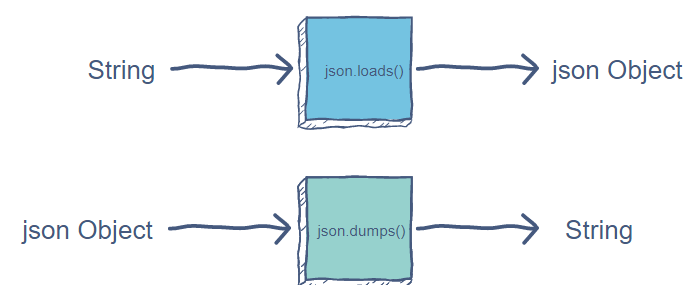
JSON 파일을 읽고 문자열을 딕셔너리로 변환
json.loads(string): 딕셔너리 반환
def create_dict(filename):
    with open(filename) as file:
        json_string = file.read()
        return json.loads(json_string)
JSON 파일을 읽고 딕셔너리를 JSON 형태의 문자열로 변환
json.dumps(dictionary): string 반환
def create_json(dictionary, filename):
    with open(filename, 'w') as file:
        json_string = json.dumps(dictionary)
        file.write(json_string)
3. CSV 파일 읽기 (Comma Seperated Value)
콤마 말고 다른 구분 문자도 사용 가능
데이터가 ,가 포함된 경우 **""**로 감싸면 된다.
CSV 불러오기
1. csv.reader(file, delimiter=','): reader메서드를 이용하여 구분자 설정 후 받아오기
2. for row in reader: 한 줄씩 읽고 처리하기
# books.csv

Fundamentals,"Goswami, Jaideva",signal_processing,228,Wiley
Data Smart,"Foreman, John",data_science,235,Wiley
God,"Hawking, Stephen",mathematics,197,Penguin
SuperMan,"Dubner, Stephen",economics,179,HarperCollins
import csv
def book_info():
with open(filename) as file:
reader = csv.reader(file, delimiter=',')
for row in reader:
title=row[0]
author=row[1]
pages=row[3]
print("{} ({}): {}p".format(title, author, pages))
filename = 'books.csv'
book_info(filename)CSV의 특징
- json에 비교해 key값을 필요로하지 않아, 같은 데이터를 저장하는 데 용량을 적게 소모함
# movies.csv
아이언맨,Iron Man,2008
겨울왕국,Frozen,2013

# movies.json
[{"ko": "아이언맨", "en": "Iron Man", "year": 2008},
{"ko": "겨울왕국, "en": "Frozen", "year": 2013}]- 구조가 취약하다.
데이터에 delimiter가 포함되어 있으면 데이터가 쉽게 잘못 나뉘어진다.