스키마 만들기: 스키마, 모델, 컬렉션
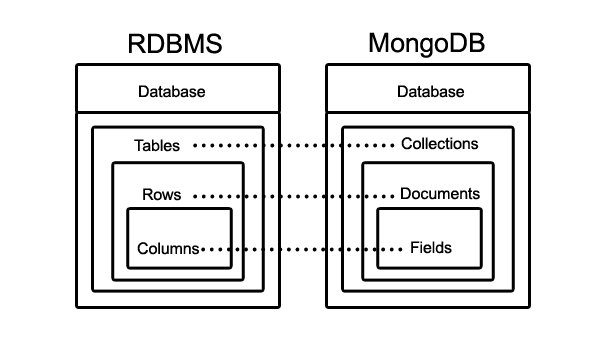
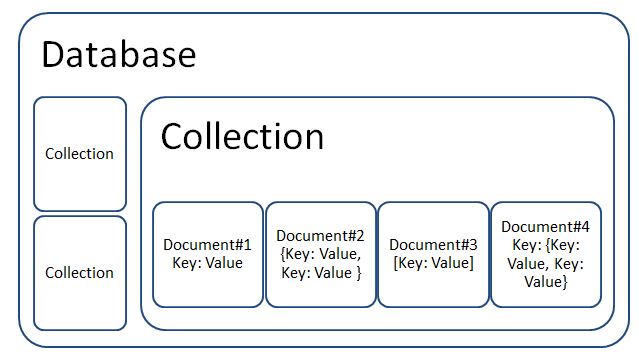
MongoDB의 구조
스키마(구조적 개념, 데이터 형태 만들기)
: Mongoose에게 데이터(=다큐먼트)를 어떤 구조로 저장해야할지 알려주는 객체이다.
모델(= document name)
: 실제 데이터를 의미한다. 스키마로 구조적 설계를 하고 모델을 생성하는 것이다.
컬렉션(추상적 개념)
: Document(데이터)가 1개이상 모여 이루어지는 것이 Collection이다.
컬렉션은 별도의 스키마를 가지고 있지 않기 때문에, 모든 필드가 required=true가 아니라면 컬렉션 안에 있는 Document는 모두 다른 구조를 가질 수 있다. Collection은 여러개 만들어서 성격에 맞는 데이터들의 문서를 저장하는 것이 효율적이다.
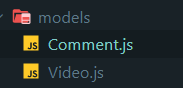
models폴더
models 폴더에 스키마 별로 js 파일들로 만든다.
//Video.js

import mongoose from "mongoose";

const VideoSchema = new mongoose.Schema({
//몽구스 라이브러를 이용하여 스키마 정의

  fileUrl: {
    type: String,
    required: "File URL is required",
    // DB에는 링크를 집어넣고, 소스(원본)파일은 AWS에 넣을 예정
  },
  title: {
    type: String,
    required: "Title is required",
  },
  description: String,
  views: {
    type: Number,
    default: 0,
  },
  createdAt: {
    type: Date,
    default: Date.now,
  },
  comments: [
    {
      type: mongoose.Schema.Types.ObjectId,
      ref: "Comment",

        // Comment모델의 ID를 타입으로 지정
        // 한 개의 비디오 다큐먼트에 Comment 스키마로 만들어진 다큐먼트의 아이디가 리스트에 저장됨
    },
  ],
});
 // 스키마 생성
//comment.js
import mongoose from "mongoose";
const CommentSchema = new mongoose.Schema({
text: {
type: String,
required: "Text is required",
},
createdAt: {
type: Date,
default: Date.now,
},
});//user.js
import mongoose from "mongoose";
import passportLocalMongoose from "passport-local-mongoose";
const UserSchema = new mongoose.Schema({
name: String,
email: String,
avatarUrl: String, //fileUrl 같은 것, 페이스북 프로필사진
facebookId: Number,
githubId: Number,
});
UserSchema.plugin(passportLocalMongoose, { usernameField: "email" });스키마 이름의 첫 스펠링은 대문자로 작성한다.
const model = mongoose.model("Video", VideoSchema);
// 'VideoSchema'스키마로 'model'모델 만들기

export default model;
// 모델을 export하기
init.js파일
import "./models/Video";
import "./models/Comment";
import "./models/User";
Load the models before using mongoDB