[CSS: flex box] flex item의 정렬과 간격 / justify-content /align-items/ align-content
사용예시
.container {
  display: flex;
  justify-content: center;
  align-items: flex-start;
  align-contents: center;
}
1. justify-content
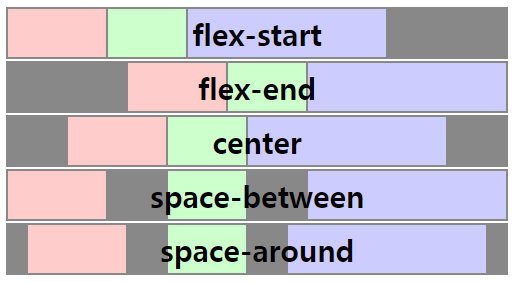
: 메인 축 정렬과 아이템 사이의 간격을 제어한다.
justify-content:
-
flex-start [default]
-
flex-end
-
center
-
space-between
-
space-around
-
space-evenly
flex-direction(메인축 설정): row | row-reverse | column | column-reverse
2. align-items
: flex item의 ‘교차 축’ 정렬을 제어한다.
align-items:
-
flex-start
-
flex-end
-
center
-
baseline
-
stretch [default]
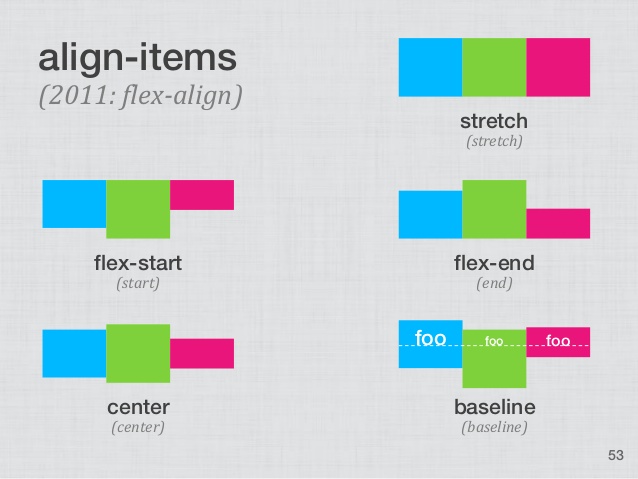
교차축이 column이니까, 세로 축을 유심히 볼 것
3. align-content
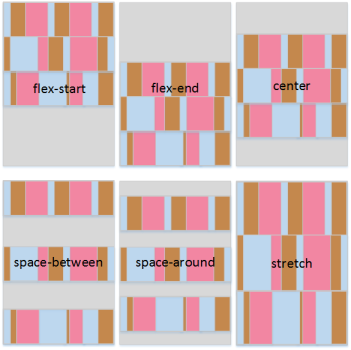
: flex item의 ‘여러 줄 교차 축’ 정렬과 간격을 제어한다.
align-items와 같은 property와 "space -xxx" 속성을 갖는다.