Promise
작성 수정
1. What is promise?
Promiseis a built-in ES6 Javascript Object for managing asynchronous control flow.- 프로미스 객체는 '콜백 지옥'을 해결하고, '비동기 처리'를 효과적으로 처리한다.
- 비동기로 작업을 수행하다가,
- 정상적으로 작동했다면
Promise.resolve(data)를 통해 data을 전달한다. - 예상치 못한 결과가 나왔다면
Promise.reject(error)를 통해 error를 전달한다.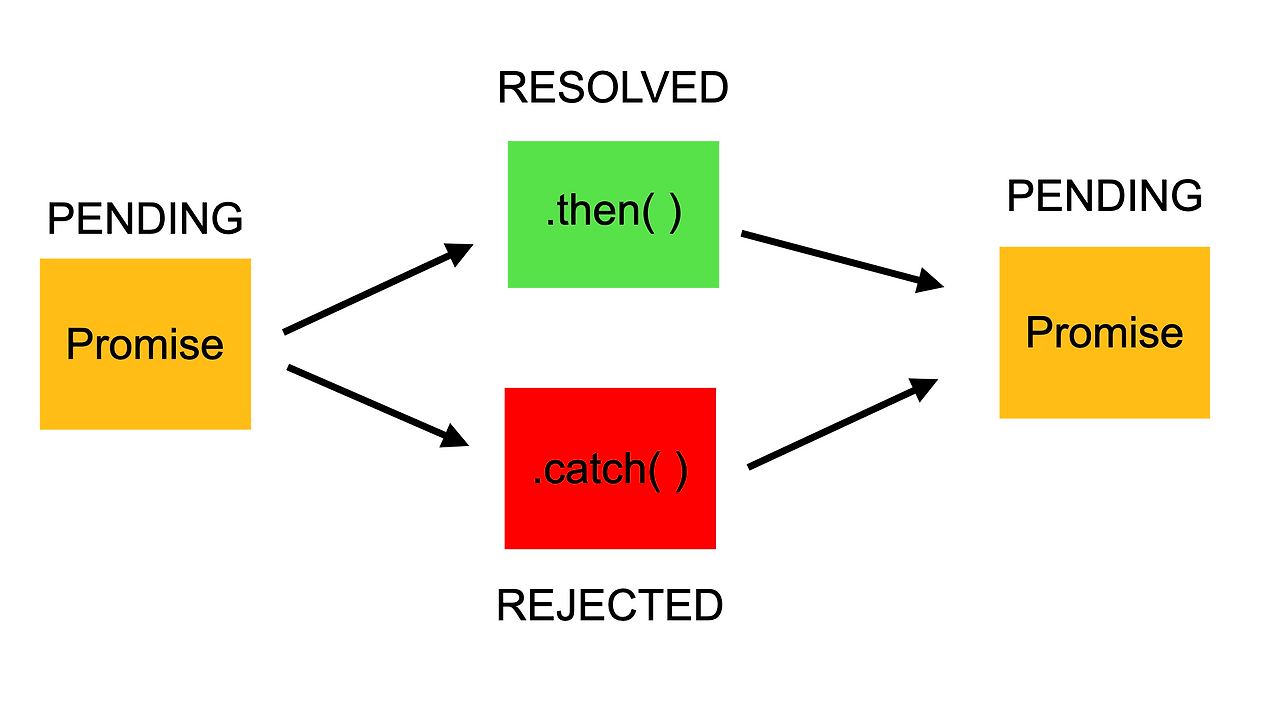
- 정상적으로 작동했다면
프로미스 객체의 추상 구조
Promise.instance = {
  [[Prototype]] : {
    then
    catch,
    finally,
  },
  [[PromiseState]] : {
    pending,
    fulfilled,
    rejected
  },
  [[PromiseResult]] : {
    data
  }
}
프로미스 객체 생성
Promise객체는new키워드와Promise생성자를 사용해 만든다.Promise생성자는 콜백 함수를 인자로 받는다.- 콜백함수는
Promise객체를 반환하기 전에 바로 실행된다. - 콜백함수는
resolve함수와reject함수를 인자로 받는다.
- 콜백함수는
const promise = new Promise(resolver);
const resolver = (resolve, reject) => {
  //   resolve나 reject 중 하나를 호출하는 비동기 작업을 수행한다.
  //   resolve(someValue)        // 'fulfilled' Promise 반환
  //   reject("failure reason")  // 'rejected' Promise 반환
});
프로미스로 감싸서 반환하는 이유 ❤️
- 프로미스는 비동기 작업의 결과를 체계적이고 안전하게 다루기 위해 도입됨
- 값을 바로 반환하지 않고 프로미스로 감싸면
then,catch,finally체이닝을 통해 비동기 작업 이후의 로직을 순차적이고 직관적으로 제어할 수 있음
2. state
resolve,reject함수를 통해 프로미스 객체의 상태를 바꿀 수 있다.- pending: 기능 수행중인 상태
- fulfilled: 성공
- rejected: 실패
1) fulfilled / resolved
fulfilled - 공식 Promise 명세에서 사용 resolved - 개발자들 사이에서 더 흔히 사용
둘 다 "Promise가 성공적으로 완료된 상태"를 의미하므로 어느 것을 사용해도 무방함
const promise = new Promise(function(resolve, reject){
    resolve('value')
})
promise.then(value => console.log(value))
// == promise.then(console.log)- 콜백 함수의 인자
resolve(value)를 실행하면value값을 지닌 Fulfilled(이행) 상태의 Promise 객체를 리턴한다. - 이행 상태가 되면
.then(value)을 이용하여 결과 값을 받을 수 있다.
2) rejected
new Promise(function(resolve, reject){
    reject(new Error('Error occurred!'))
})
promise.catch(err=>console.log(err))- 콜백 함수의 인자
reject()를 실행하면 Rejected(error) 상태의 Promise 객체를 리턴한다 - 실패 상태가 되면, 실패 처리 결과 값을 후속 처리 메소드
catch()로 받아 처리할 수 있다.
3. producer / consumer
- producer:
promise인스턴스를 지칭한다. - consumer
.then(),.catch(),.finally()Promise 객체의 상태에 따라 처리 할 후속 처리 메소드를 일컫는다.- 비동기에서 성공과 실패를 분리해서 메서드를 수행할 수 있다.
1) Producer 정의
- Producer와 executor는 같은 것을 지칭하는 다른 용어
- 둘 다 Promise 생성 시 전달되는 콜백 함수를 의미함
const promise = new Promise((resolve, reject) => {
    // doing some heavy work(network, read files)
    // setTimeout(() => console.log("doing some heavy work"), 2000);
    if(success){
      resolve('junha');
    } else {
      reject(new Error('no network'));
    }
});
const asyncFunction = (param) => {
return new Promise((resolve, reject) => {
if (param){
resolve(param);
} else {
reject(new Error());
}
}
}2) Consumer 정의
- 프로미스 실행
promise
    .then((value) => {
        console.log(value); // 4
    })
    .catch((error) => {
        console.log(error); // 2
    })
    .finally(() => {
        console.log('finally'); // 3
});asyncFunction(argv)
.then((value) => {})
.catch((error) => {})// 체이닝 예시
asyncThing1()
.then(function() { return asyncThing2();})
.then(function() { return asyncThing3();})
.catch(function(err) { return asyncRecovery1();})
.then(function() { return asyncThing4();}, function(err) { return asyncRecovery2(); })
.catch(function(err) { console.log("Don't worry about it");})
.then(function() { console.log("All done!");});3) 프로미스 객체의 메소드
(1) .then(onFulfilled, onRejected);
then메소드는 두 개의 콜백 함수를 인자로 받는다.- 첫 번째 콜백 함수는 Fulfilled, resolve 함수가 호출된 상태시, 호출되고
- 두 번째 함수는 Reject, reject 함수가 호출된 상태시 호출된다.
- then 메소드는 Promise를 반환한다.
onFulfilled의 반환값
// 시간 지연을 시뮬레이션하는 함수
const delay = ms => new Promise(resolve => setTimeout(resolve, ms));

// 예시 1: 일반값 반환
Promise.resolve('시작')
  .then(result => {
    console.log(result); // '시작' 즉시 출력
    return '끝';  // 일반값 반환
  })
  .then(result => {
    console.log(result); // '끝' 즉시 출력
  });

// 예시 2: Promise 반환
Promise.resolve('시작')
  .then(result => {
    console.log(result); // '시작' 즉시 출력
    return delay(2000).then(() => '끝'); // Promise 반환
  })
  .then(result => {
    console.log(result); // 2초 후에 '끝' 출력
  });
// onFulfilled 콜백의 반환값 처리가 핵심
handleCallback(onFulfilled, resolve) {
try {
// 콜백 실행하여 반환값 받기
const returnValue = onFulfilled(this.value);
// 반환값이 Promise인지 확인
if (returnValue instanceof MyPromise) {
// Promise를 반환한 경우, 해당 Promise가 완료될 때까지 대기
returnValue.then(value => {
resolve(value);
});
} else {
// 일반 값을 반환한 경우, 바로 resolve
resolve(returnValue);
}
} catch (error) {
// 에러 처리는 생략
}
}Promise의 .then() 콜백함수가 반환하는 값의 동작을 정리하면:
일반값을 리턴할 경우:
바로 다음 체인의 콜백함수로 전달됨
Promise를 리턴할 경우:
해당 Promise가 fulfilled될 때까지 기다림 fulfilled된 값을 다음 체인의 콜백함수로 전달
이런 동작 덕분에 비동기 작업들을 순차적으로 처리할 수 있게 된다
(2) .catch(onRejected);
- 예외(비동기 처리 또는 then 메소드에서 발생한 에러)가 발생하면 호출된다.
- catch 메소드는 Promise를 반환한다.
(3) .finally(onFinally);
- Promise가 처리되면 상태에 상관없이 지정된 콜백 함수가 실행된다.
finally에서는 어떠한 인자도 받을 수 없다
3. Promise Chaining
.then()과.catch()는Promise를 리턴한다.- 따라서
.then()또는catch()로 다시 체이닝 할 수 있다. .catch()에.then()이 붙어있다면,catch에서 리턴한 값은then으로 전달된다.
예시1) 체이닝 예시 코드
const fetchNumber = new Promise((resolve, reject) => {
    setTimeout(() => resolve(1), 1000);
});

fetchNumber
    .then((num) => num * 2)
    .then((num) => num * 3)
    .then((num) => {
        return new Promise((resolve, reject) => {
            setTimeout(() => resolve(num - 1), 1000);
        });
    });
    .then(num => console.log(num))
예시2) 웹 서비스 인증 코드
var userInfo = {
  id: 'test@abc.com',
  pw: '****'
};

function parseValue() {
  return new Promise({
    // ...
  });
}
function auth() {
  return new Promise({
    // ...
  });
}
function display() {
  return new Promise({
    // ...
  });
}getData(userInfo)
.then(parseValue)
.then(auth)
.then(diaplay);.then()이 Promise 객체를 반환하기 때문에 체이닝이 가능하다.
4. Error Handling
1) then() 의 두번째 인자를 활용하는 방법
getData()
    .then(onFulfilled, onRejected);
2) catch()를 이용하는 방법
getData()
    .then()
.catch();getData().catch(function (err) {
console.log(err);
});
getData().then(undefined, function (err) {
console.log(err);
});catch()는then(undefined, onRejected)를 호출한다.
3) .catch() 사용을 권장한다
예시) then()의 첫번째 콜백 함수 내부에서 오류가 나는 경우
function getData() {
  return new Promise(function (resolve, reject) {
    resolve("hi");
  });
}getData().then(
function (result) {
console.log(result);
throw new Error("Error in then()");
// Uncaught (in promise) Error: Error in then()
},
function (err) {
console.log("then error : ", err);
// this can't caught "Error in then()" Error
}
);then()의 첫 번째 콜백 함수 내부에서 오류가 나는 경우 잡아내지 못한다.
getData()
  .then(function (result) {
    console.log(result); // hi
    throw new Error("Error in then()");
  })
  .catch(function (err) {
    console.log("then error : ", err);
    // then error :  Error: Error in then()
});.catch()메소드를 모든.then()메소드를 호출한 이후에 호출하면, 비동기 처리에서 발생한 에러(reject 함수가 호출된 상태)뿐만 아니라 then 메소드 안에서 발생한 에러까지 모두 캐치할 수 있다.- 따라서 가독성도 좋고 더 많은 예외 처리 상황을 위해
catch()로 에러 처리를 해주는 것이 좋다.
4) 재미있는 예시
const getHen = () => {
    new Promise((resolve, reject) => {
        setTimeout(() => resolve('🐔'), 1000);
    });
};

const getEgg = (hen) =>
    new Promise((resolve, reject) => {
        setTimeout(() => resolve(`${hen} => '🥚'`), 1000);
    });

const getFry = (egg) =>
    new Promise((resolve, reject) => {
        setTimeout(() => resolve(`${egg} => '🥯'`), 1000);
    });

getHen()
    .then((hen) => getEgg(hen))
    .catch((error) => {
        return `${egg} => '🍕'`;
    })
    .then((egg) => getFry(egg))
.then((meal) => console.log(meal));.then((hen) => getEgg(hen))
.then(getEgg)
// 아규먼트가 동일할 경우 생략이 가능하다.5. Promise의 다양한 메서드
1. Promise.all(iterable): array
- promise가 담긴 iterable 객체를 인자로 전달한다.
- 모든 promise들이 병렬적으로 완료된 후에, Promise를 반환한다.
- 주어진 프로미스 중 하나가 거부하는 경우, 첫 번째로 거절한 프로미스의 이유를 사용해 자신도 거부한다.
const promise1 = Promise.resolve(3);
const promise2 = 42;
const promise3 = new Promise((resolve, reject) => {
  setTimeout(resolve, 100, 'foo');
});

Promise.all([promise1, promise2, promise3]).then((values) => {
  console.log(values);
});
// expected output: Array [3, 42, "foo"]
function pickAllFruits() {
return Promise.all([getApple(), getBanana()]).then((fruits) =>
fruits.join('+')
);
}
pickAllFruits().then(console.log);2. Promise.race()
Promise.race([func1(), func2()])- 가장 먼저
settled된promise를 반환한다.
function pickOnlyOne() {
    return Promise.race([getApple(), getBanana()]);
}
pickOnlyOne().then(console.log);
3. Promise.any()
- 가장 먼저
fulfilled된promise를 반환한다. - 모든
promise가rejected되면,AggregateError를 가진promise를반한한다.
const promise1 = Promise.reject(0);
const promise2 = new Promise((resolve) => setTimeout(resolve, 100, 'quick'));
const promise3 = new Promise((resolve) => setTimeout(resolve, 500, 'slow'));

const promises = [promise1, promise2, promise3];

Promise.any(promises).then((value) => console.log(value));

// expected output: "quick"