Operator
작성
1. +: String concatenation(문자열 연결)
'my' + 'cat';
// mycat

'1' + 2;
// String 12

`string literals 1 + 2 = ${1 + 2}`;
// 'string literals 1 + 2 = 3'
2. Numeric operators
"10" + "2"
// 102 :string concatenation

"10" - "2"
// 8 : :arithmetic operation

"10" * "2"
// 20  :arithmetic operation

"10" / "2"
// 5   :arithmetic operation

"10" % "2"
// 0   :arithmetic operation

2 ** 10
// 1024++, --: Increment and decrement operators
let counter1 = 1;
let counter2 = 1;

const preIncrement = ++counter1;
// 2

const postIncrement = counter2++;
// 1
4) +=: Assignment operators
let x = 3;
let y = 6;
x += y; // x=x+y
5) <, >: Comparison operators
- return
booleantype
console.log(10 < 6); // false||, &&: Logical operators
||- 처음으로
true가 나오면, 거기서 연산이 멈추고 뒤의 코드를 읽지않는다. - heavy한 함수는 마지막에 넣어 효율적으로 계산하게 한다.
- 처음으로
const value1 = false;
const value2 = 4 < 2;

function check() {
    for (let i = 0; i < 5; i++) {
        console.log('😨');
    }
    return true;
}

console.log(value1 || value2 || check());&&falsy값이 나오면, 거기서 연산이 멈춰, 뒤의 코드를 읽지 않는다.falsy:false,'',0,-0,null,undefined,NaN
isLoggedin && dosomething();

{} && 1
// 1
// `{}`는 `falsy`하지 않아 true로 받아들인다.
7) ==, === Equiality operators
0 == false; // true
0 === false; // false

'' == false; // true
'' === false; // false

null == undefined; // true
null === undefined; // false==연산자는 값만 비교===연산자는 데이터 타입을 우선 비교한 후에 값을 비교함
const ellie1 = { name: 'ellie' };
const ellie2 = { name: 'ellie' };
const ellie3 = ellie1;

ellie1 == ellie2;
// false 다른 레퍼런스를 갖고 있기 때문이다.

ellie1 === ellie2;
// false

ellie1 === ellie3;
// true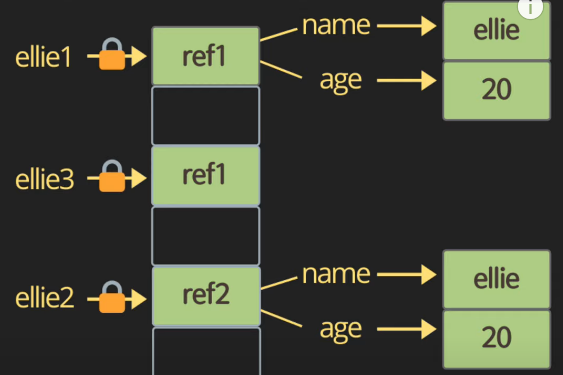
Ternary operator
var name = junha;
name === 'junha' ? 'yes' : 'no';
Nested Ternary operator
- A ? B ? C : D : E
- A ? (B ? C : D) : E
true ? true ? 1 : 2 : 3      // 1
true ? false ? 1 : 2 : 3     // 2
false ? true ? 1 : 2 : 3     // 3

false ? false ? 1 : 2 : 3    // 3
in operator
- 해당
key가object에 있는지 확인하는 연산자
'name' in junha;
 // true

'random' in junha;
// false

junha.random;
// undefined
9) Switch operator
const browser = 'IE';
switch (brower) {
    case 'IE':
        console.log('go away!');
        break;
    case 'Chrome':
    case 'Firefox':
        console.log('I love you');
        break;
    default:
        console.log('same all');
        break;
}
10) While loop
let i = 3;
while (i > 0) {
    i--;
}- 조건 먼저 검사하고 블록을 실행하게 한다.
11) do-while loop
var i = 0

do {
    console.log('Hi');
    i++;
} while (i > 5); // Hi 1회 출력
- while 조건과 관계없이 무조건 1회 실행한다.
12) for loop
for (kim = 3; kim > 0; kim--) {
    console.log(kim);
}

for (junha = 3; junha > 0; junha--) {
    console.log(junha);
}window.kim,winodw.junha에 선언이 됐기 때문이다.
for (let leo = 3; leo > 0; leo--) {
    console.log(leo);
}
console.log(leo); // leo is note defined