Branches in a Nutshell
작성
Git branches
Git은 다른 VCS와 달리 정말 가볍고, 빠르다.- 데이터를 변경사항(Diff)으로 기록하지 않고 일련의 스냅샷으로 기록하기 때문이다.
커밋과 트리 데이터
git add README test.rb LICENSE
git commit -m 'The initial commit of my project'
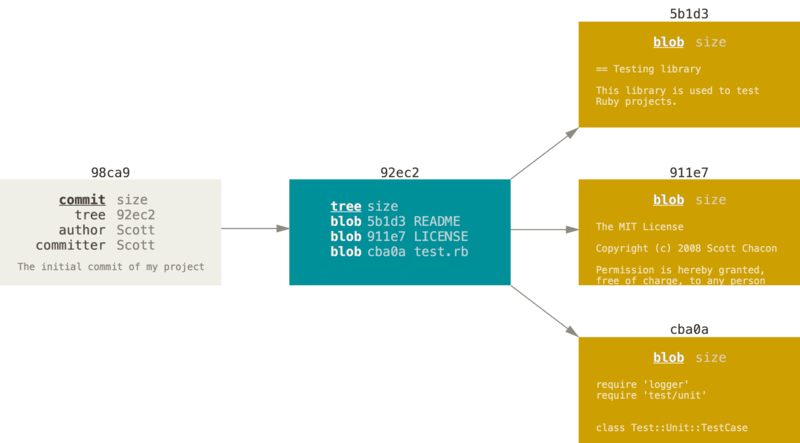
파일 구성 요소
- 각 파일에 대한 blob 세 개
- 파일과 디렉토리 구조가 들어 있는 트리 객체 한 개
- 메타 데이터와 루트 트리를 가리키는 포인터가 담긴 커밋 객체 한 개
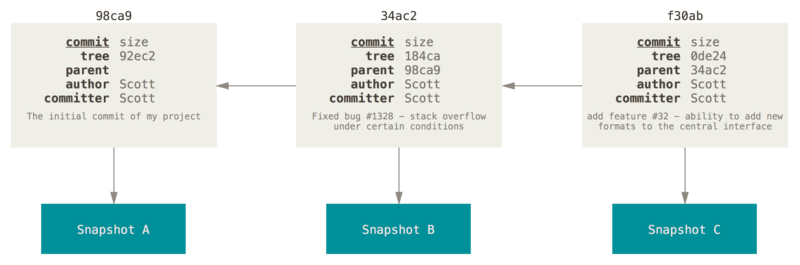
- 파일을 수정하고 커밋하면 이전 커밋이 무엇인지도 저장한다.
- 깃 브랜치는 커밋 사이를 가볍게 이동할 수 있는 포인터와 같다.
Creating a New Branch
1. git branch <testing>
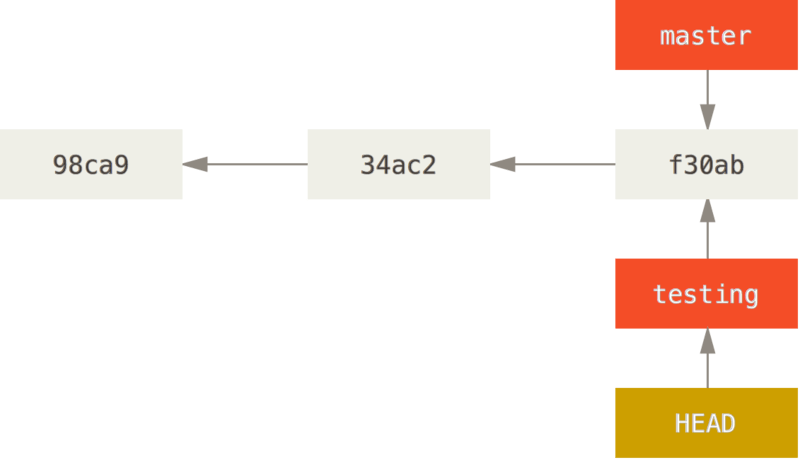
- Two branches pointing into the same series of commits
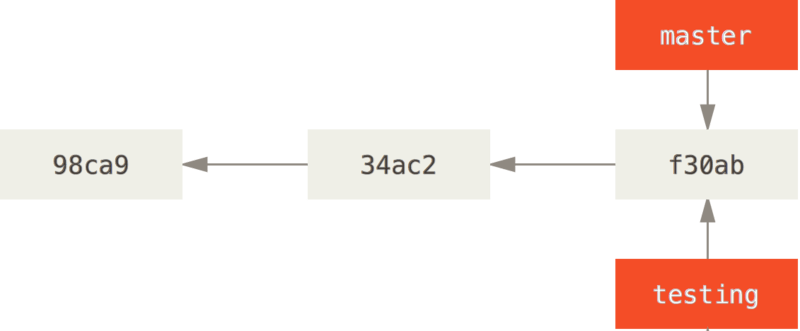
HEAD라는 특수한 포인터는 지금 작업하고 있는 로컬 브랜치를 가리킨다.- The
git branchcommand only created a new branch, it didn’t switch to that branch.
2.git log --oneline --decorate
--decorate: 브랜치가 어떤 커밋을 가리키는지 확인
f30ab (HEAD -> master, testing) Add feature #32 - ability to add new formats to the central interface
34ac2 Fix bug #1328 - stack overflow under certain conditions
98ca9 Initial commit
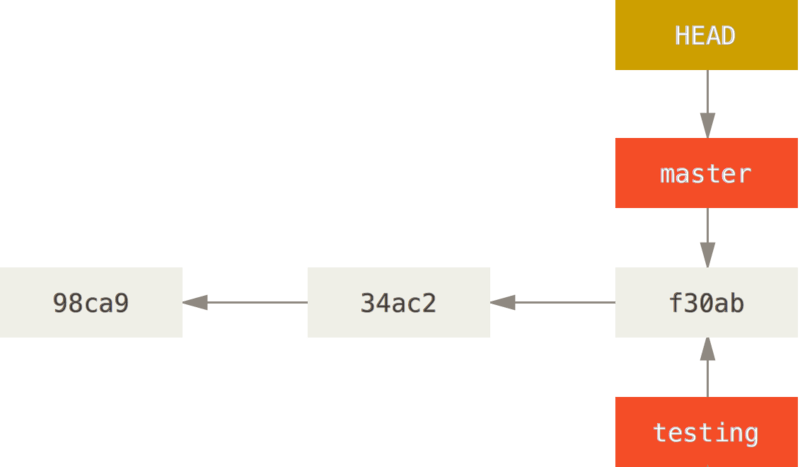
Switching Branches
1. git checkout <testing>
git checkout <branch-name>: 브랜치 이동- This moves
HEADto point to thetestingbranch.
2.git commit -a -m 'made a change'
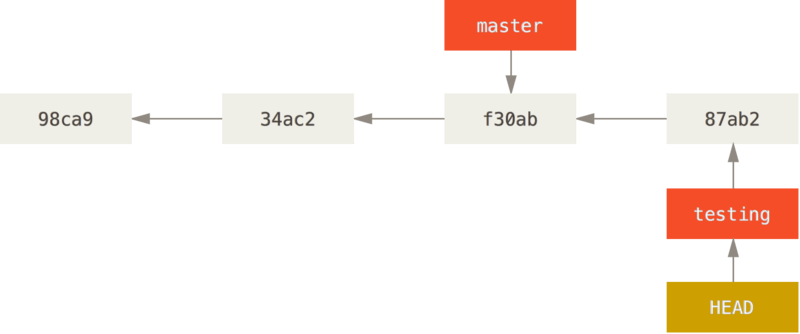
testingbranch has moved forwardmasterbranch는 여전히 이전 커밋을 참고하고 있다.
3. git checkout master
HEADmoves when you checkout
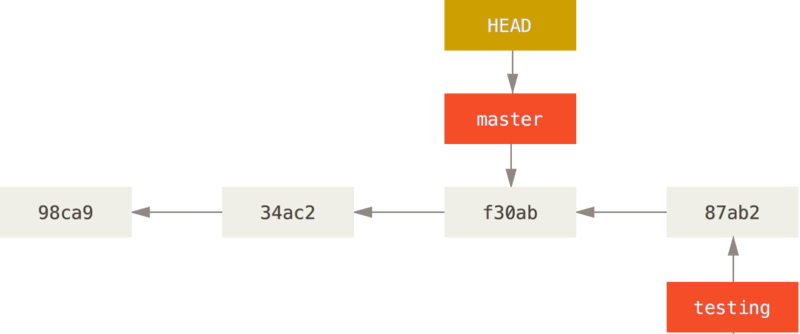
git checkout 이 수행한 2가지
- It moved the
HEADpointer back to point to themasterbranch - It reverted the files in your working directory back to the snapshot that master points to.
- This also means the changes you make from this point forward will diverge from an older version of the project. It essentially rewinds the work you’ve done in your testing branch so you can go in a different direction.
Switching branches changes files in your working directory
- It’s important to note that when you switch branches in Git, files in your working directory will change. If you switch to an older branch, your working directory will be reverted to look like it did the last time you committed on that branch. If Git cannot do it cleanly, it will not let you switch at all.
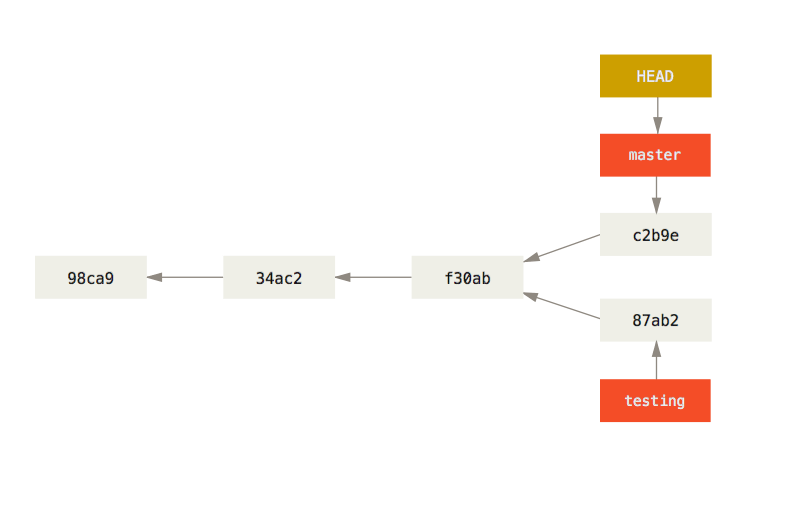
4. git commit -a -m 'made other changes'
-
Now the project history has diverged (see Divergent history)
-
두 브랜치는 독립적으로 커밋 사이를 자유롭게 이동하다가 때가 되면 두 브랜치를
Merge한다.
Branches are cheap to create and destroy
- A branch in Git is actually a simple file that contains the 40 character SHA-1 checksum of the commit it points to
- Creating a new branch is as quick and simple as writing 41 bytes to a file (40 characters and a newline).
git checkout -b <newbranchname>
- Creating a new branch and switching to it at the same time
- It’s typical to create a new branch and want to switch to that new branch at the same time.
From Git version 2.23 onwards you can use git switch instead of git checkout
- Switch to an existing branch
git switch testing-branch
- Create a new branch and switch to it
git switch -c new-branch.
- The
-cflag stands for create, you can also use the full flag:--create. - Return to your previously checked out branch
git switch -.